Track usage in the Notion credits dashboard
Learn how to use the Notion credits dashboard to track usage, plan future credit needs, and manage ongoing spend 📈
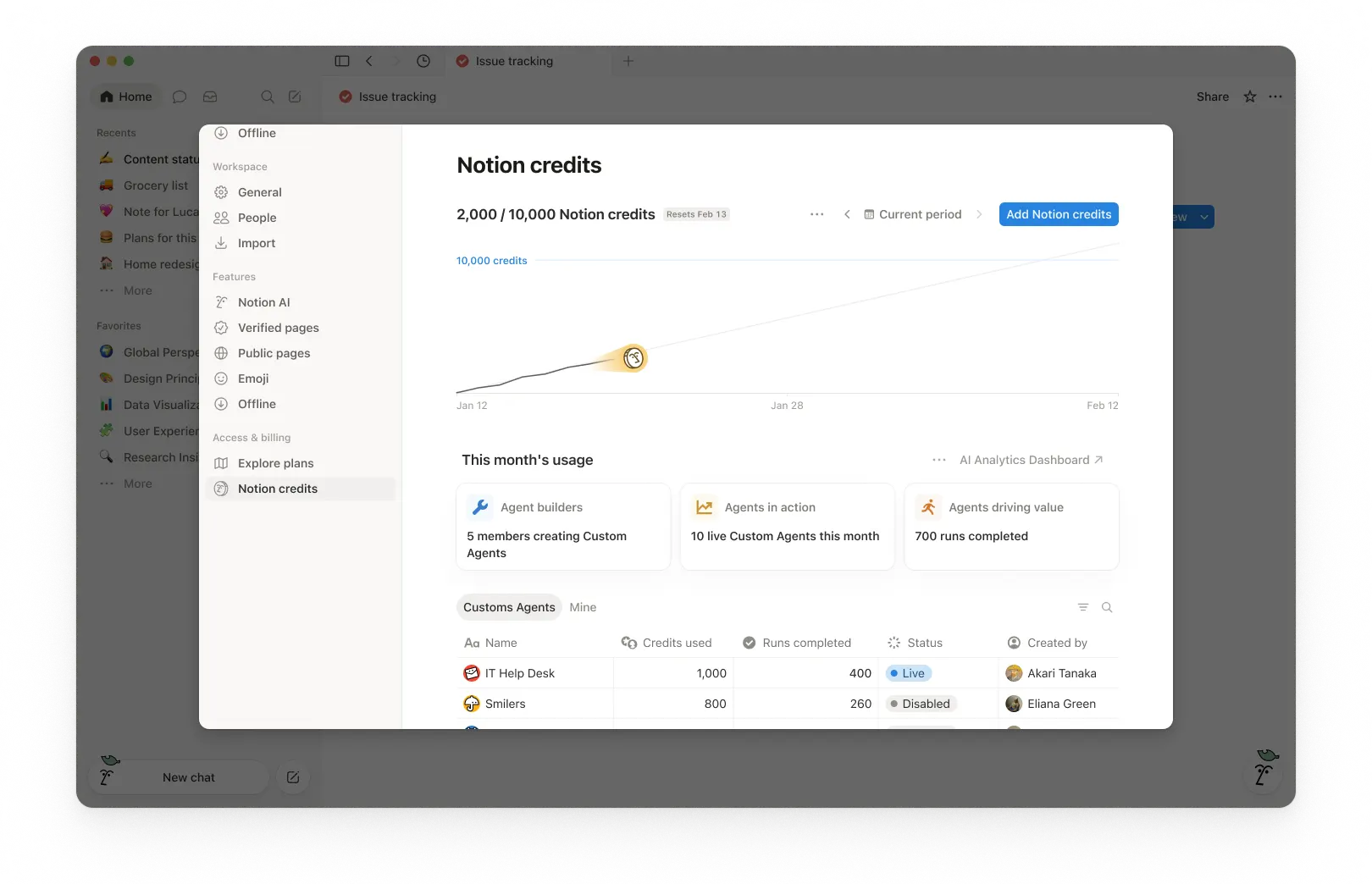
Chuyển đến Câu hỏi thường gặpThe Notion credits dashboard gives a clear view of how Custom Agents, Autofill, and Workers use Notion credits across the workspace. Use it to track usage, plan future credit needs, and manage ongoing spend. To access it, go to Settings → Access & billing → Notion credits.
Admins on Business and Enterprise plans can monitor usage in the dashboard. Custom Agent creators and Worker creators can also see workspace-level credit pacing. The table will show only the Custom Agents or Workers they've created.
In the dashboard, you can monitor:
Credit usage in real time.
Estimated usage through your monthly service date.
Agent-level runs and credit usage, so you can identify the agents driving spend and adjust them as needed.
If you manage multiple workspaces, you’ll also have a Notion credits dashboard in your admin console where you can track credit pacing and usage across your organization.
1. Usage summary
At the top of the dashboard, you’ll see the total Notion credits used for the selected period and your credits reset date. The selected period is based on your workspace’s billing cycle.
This gives you a quick snapshot of usage so far and when your monthly billing cycle ends.
2. Time period controls
In the top-right corner, use the period selector (for example, Current period) and navigation arrows to review past periods.
3. Usage chart
The usage chart shows credit usage over time:
Current shows your actual credits used so far.
Estimated projects where your usage is likely to land by the reset date if current patterns continue. The estimate is provided for informational purposes only and actual future usage may differ.
Use this to spot whether you’re pacing toward running out of credits before the reset.
4. Workspace usage cards
Under This month’s usage, you’ll see adoption and activity metrics such as:
Agent builders: How many members are creating Custom Agents.
Agents in action: How many live Custom Agents are running during the period.
Runs completed: How many tasks agents have completed across your workspace.
5. Usage breakdown
The usage table is organized into tabs so you can filter by type.
All: Every Custom Agent, Autofill, and Worker in your workspace.
Custom Agents: Custom Agent spend only.
Autofill: Autofill spend only.
Workers: Worker spend only. Workers show a Free badge during the beta period.
Mine: Only the Custom Agents and Workers you created
For each item, the table shows:
Notion credits used
Runs completed
Status
Created by
Include Worker spend in the main chart
By default, Worker spend is tracked separately from Custom Agent spend and isn't included in the main usage chart or total credit number. To fold Worker spend into the chart and total, select the three-dot menu ••• at the top of the dashboard and toggle on Include Worker spend.
What actions can an admin take to manage credit pacing?
Admins can monitor credit usage and control how Custom Agents run so spend stays predictable.
Admins have several ways to manage credit pacing:
Visibility: Track usage and trends in the Notion credits dashboard.
Guardrails: Decide who can create agents (and set limits).
Control: Pause or switch off agents anytime to stop usage while you investigate or make changes.
Optimize: Fine-tune agents to reduce extra steps and improve efficiency.
1. Monitor usage to know what’s driving spend
Use the Notion credits dashboard to track usage over time and see which features are using the most credits. Notion also notifies admins when the workspace is approaching or has reached the credit limit, so admins have time to act.
2. Set guardrails to prevent surprises
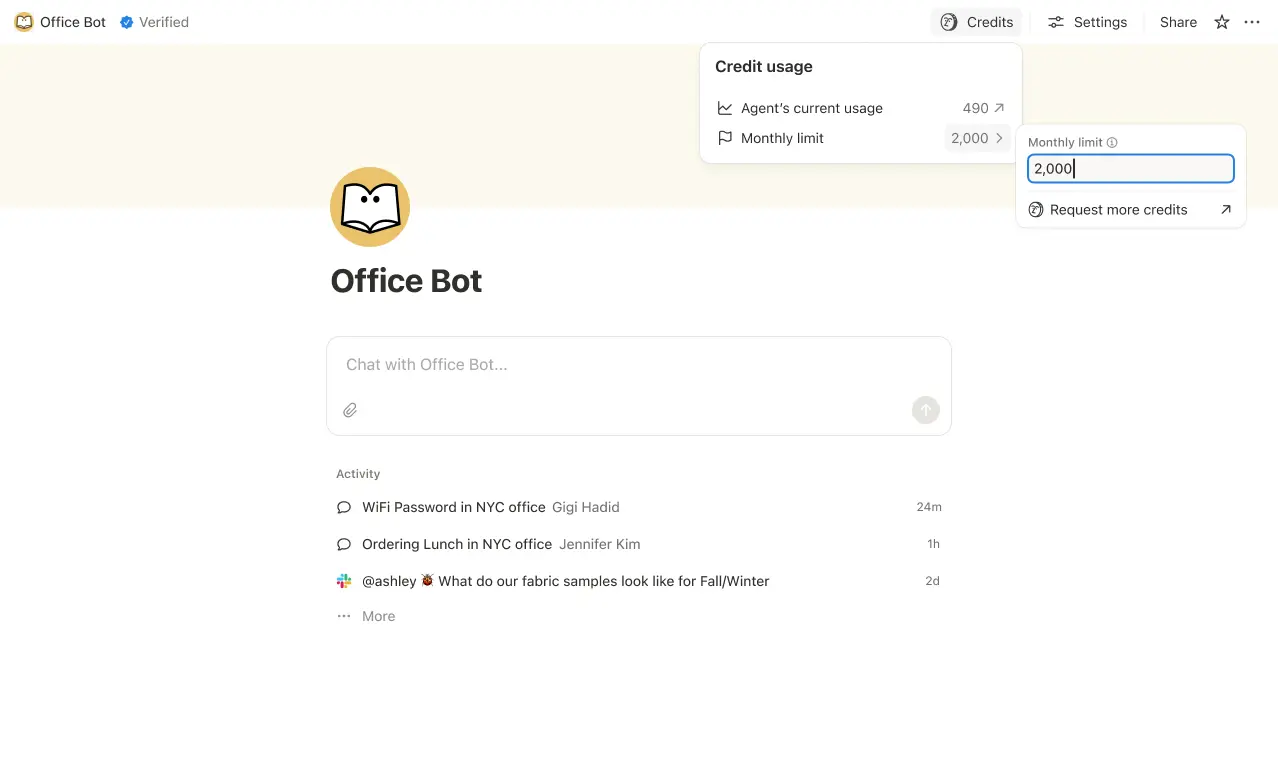
Set credit limits for individual Custom Agents so they pause when they hit a threshold. In some cases, an agent may go over the limit in order to complete an ongoing task. If a task is already running when it hits the cap, we let it finish before stopping new usage.
Control who can create Custom Agents (everyone, workspace owners only, or selected members).

3. Intervene quickly to stop usage
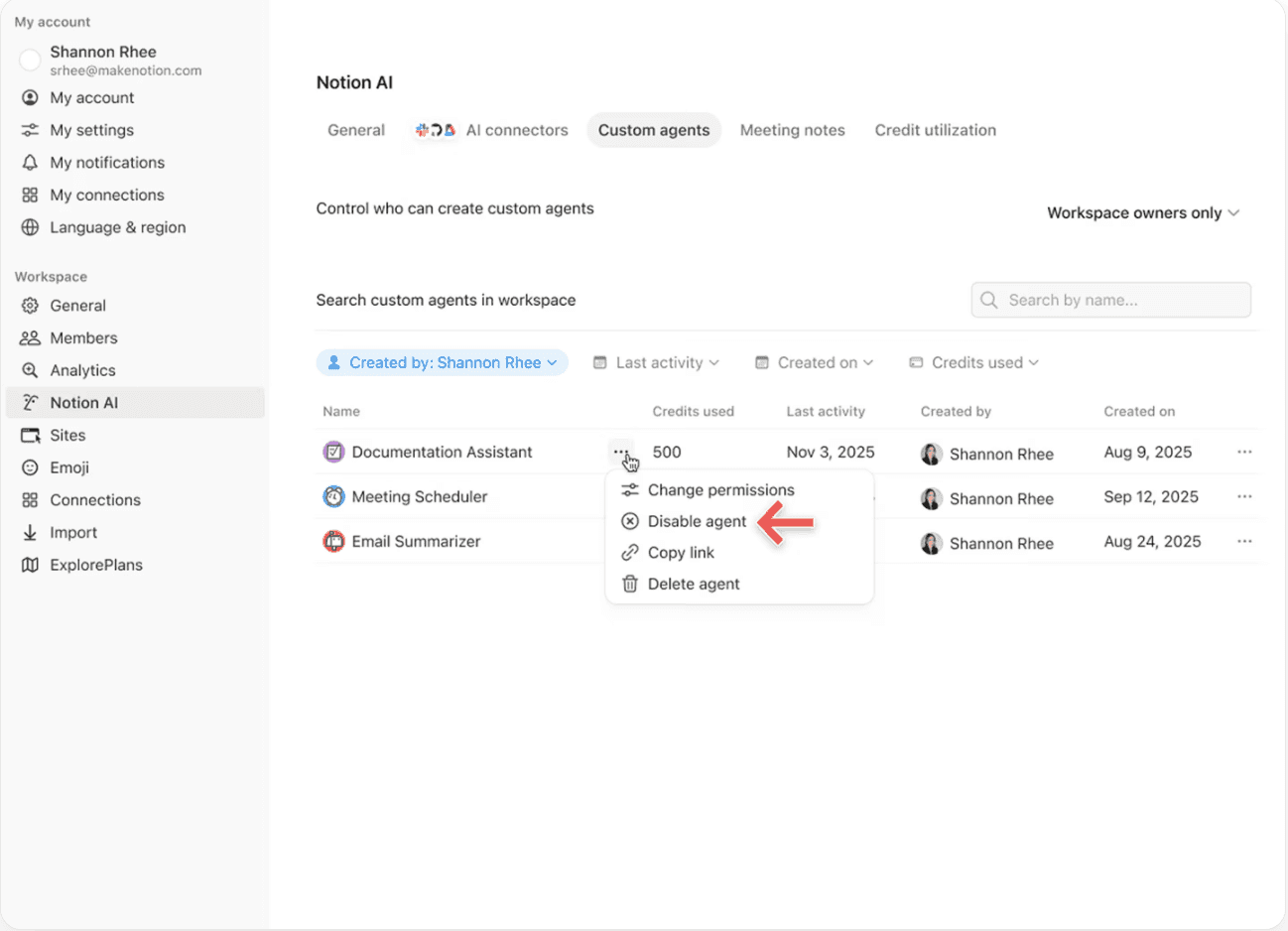
Pause or switch off a Custom Agent anytime to immediately stop credit usage while you review activity or adjust the agent.
4. Use Insights to optimize performance
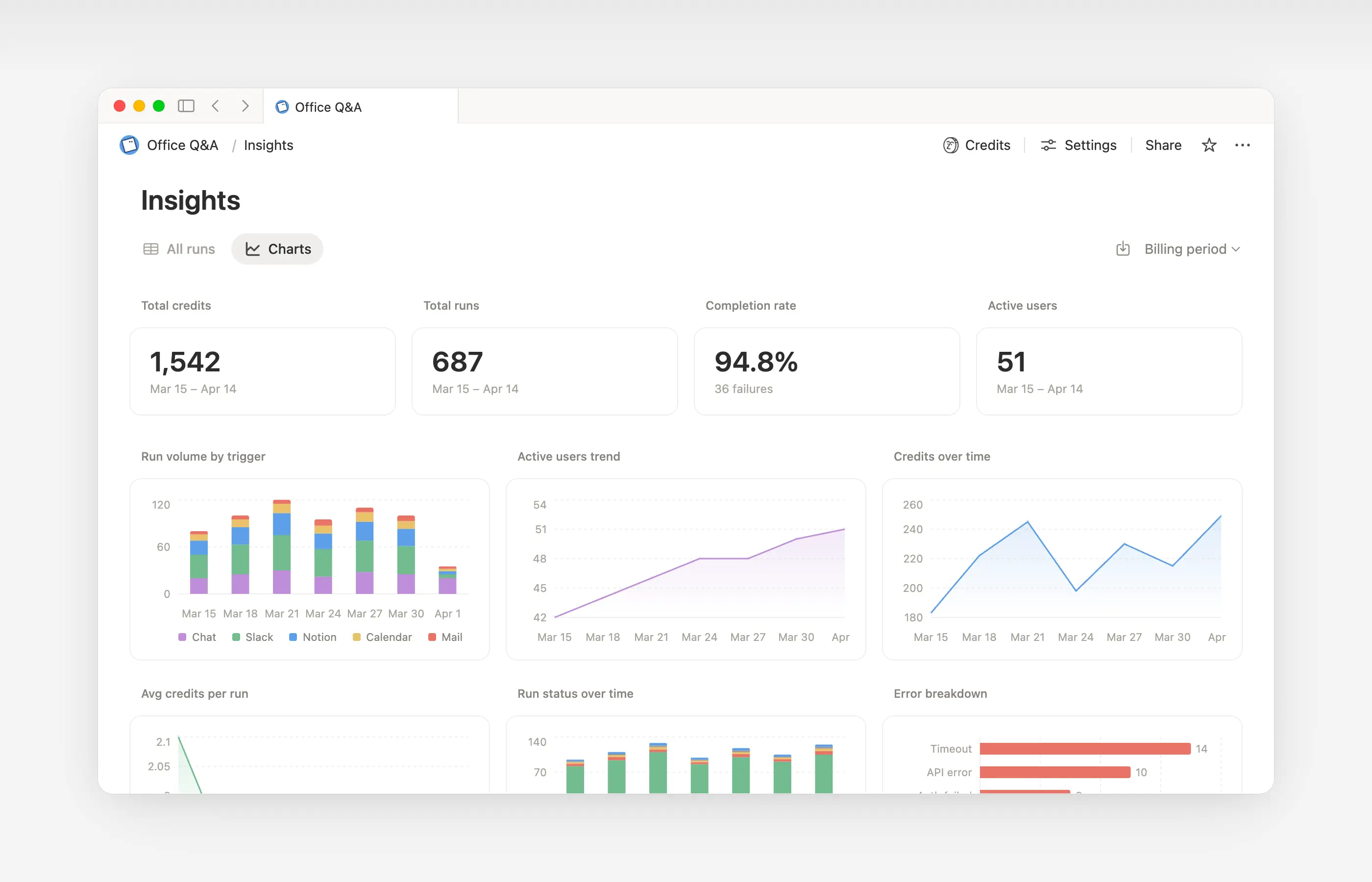
Insights helps Custom Agent creators and workspace admins understand activity so they can make targeted updates that improve performance. Use Insights to spot runs that take extra steps, fail and retry, or use a more expensive model than the job requires. Then, update the agent’s instructions or settings so it runs more efficiently.
Open Insights directly within an agent to:
Monitor your Custom Agent’s activity and credit usage.
Identify runs that are more expensive than expected.
Review what models, tools, and triggers were used.
Find and fix failed runs so your agent works more reliably.
Learn more about how to use Insights to reduce costs and improve a Custom Agent →

Learn what Custom Agents are and how they work.
Learn how Custom Agents access information, how sharing works, and what admins can control: Custom Agents sharing and permissions →
See more best practices on optimizing Notion credits and efficiency for Custom Agents in an admin’s guide to getting started with Custom Agents →
Câu hỏi thường gặp
Điều gì sẽ xảy ra nếu chúng tôi hết tín dụng Notion?
Điều gì sẽ xảy ra nếu chúng tôi hết tín dụng Notion?
Nếu không gian làm việc của bạn không có đủ tín dụng Notion, các trợ lý tùy chỉnh sẽ tự động tạm dừng cho đến khi tín dụng được đặt lại hoặc quản trị viên thêm tín dụng.
Làm thế nào để quản trị viên nhận được thông báo trước khi hết tín dụng Notion?
Làm thế nào để quản trị viên nhận được thông báo trước khi hết tín dụng Notion?
Quản trị viên sẽ nhận được thông báo trong ứng dụng (và qua email) khi không gian làm việc của bạn đạt 80% và 100% mức sử dụng tín dụng Notion, để bạn có thời gian điều chỉnh trước khi các trợ lý tùy chỉnh tạm dừng.
Làm thế nào để tôi mua thêm tín dụng Notion?
Làm thế nào để tôi mua thêm tín dụng Notion?
Quản trị viên có thể mua tín dụng Notion trực tiếp trong sản phẩm hoặc thông qua nhóm phụ trách tài khoản của họ. Tìm hiểu thêm về cách mua tín dụng Notion.
Việc thay đổi tín dụng Notion giữa tháng hoạt động như thế nào?
Việc thay đổi tín dụng Notion giữa tháng hoạt động như thế nào?
Nếu bạn tăng số lượng tín dụng của mình vào giữa kỳ dịch vụ hàng tháng, các tín dụng bổ sung sẽ khả dụng ngay lập tức cho kỳ dịch vụ hiện tại. Bạn sẽ được tính phí cho số lượng tín dụng định kỳ cao hơn vào ngày bắt đầu kỳ dịch vụ hàng tháng tiếp theo của bạn.
Nếu bạn giảm số lượng tín dụng của mình vào giữa kỳ dịch vụ hàng tháng, số lượng thấp hơn sẽ có hiệu lực vào đầu kỳ dịch vụ tiếp theo. Kể từ đó, bạn sẽ được tính phí cho số lượng tín dụng định kỳ thấp hơn mỗi tháng.
Tôi làm việc với một nhóm phụ trách tài khoản để mua tín dụng Notion. Điều gì sẽ xảy ra nếu tôi nâng cấp, mở rộng hoặc gia hạn gói Business hoặc Enterprise của mình, gói bao gồm Tín dụng Notion hàng năm, vào giữa kỳ thanh toán của tôi?
Tôi làm việc với một nhóm phụ trách tài khoản để mua tín dụng Notion. Điều gì sẽ xảy ra nếu tôi nâng cấp, mở rộng hoặc gia hạn gói Business hoặc Enterprise của mình, gói bao gồm Tín dụng Notion hàng năm, vào giữa kỳ thanh toán của tôi?
Bạn sẽ nhận được khoản tín dụng được tính theo tỷ lệ cho các Tín dụng Notion hàng năm trả trước chưa sử dụng, bằng với giá trị thấp hơn giữa:
Số tiền đô la của Tín dụng Notion hàng năm còn lại chưa sử dụng, hoặc
Phí Tín dụng Notion hàng năm được tính theo tỷ lệ cho thời gian còn lại trong thời hạn gói đăng ký
Tín dụng này được áp dụng khi một đơn đặt hàng Business hoặc Enterprise mới thay thế đơn đặt hàng hiện tại của bạn trước khi thời hạn gói đăng ký kết thúc. Tín dụng Notion không có giá trị quy đổi thành tiền mặt. Mọi khoản tín dụng đều được áp dụng cho gói mới.
Tính năng Tự động điền có sử dụng tín dụng Notion không?
Tính năng Tự động điền có sử dụng tín dụng Notion không?
Tính năng Tự động điền có hai tùy chọn: Cơ bản và trợ lý tùy chỉnh.
Tính năng Tự động điền cơ bản được bao gồm trong các gói Business và Enterprise, và không sử dụng tín dụng Notion.
Tính năng Tự động điền trợ lý tùy chỉnh sử dụng tín dụng Notion vì nó chạy với các khả năng của trợ lý tùy chỉnh (như sử dụng ngữ cảnh phong phú hơn và khả năng suy luận nâng cao hơn).
Điều gì sẽ xảy ra với các trợ lý tùy chỉnh nếu tôi hạ cấp gói của mình?
Điều gì sẽ xảy ra với các trợ lý tùy chỉnh nếu tôi hạ cấp gói của mình?
Nếu bạn hạ cấp gói Notion của mình xuống Miễn phí hoặc Plus, tất cả các trợ lý tùy chỉnh hiện có sẽ bị tắt, nhưng không bị xóa. Bạn có thể xem (nhưng không thể chỉnh sửa) trang trò chuyện và cài đặt của trợ lý tùy chỉnh. Các trợ lý tùy chỉnh có thể tiếp tục hoạt động nếu bạn nâng cấp trở lại gói Business hoặc Enterprise.
Tôi có thể mua tín dụng Notion nếu tôi quản lý gói đăng ký của mình thông qua App Store hoặc Google Play không?
Tôi có thể mua tín dụng Notion nếu tôi quản lý gói đăng ký của mình thông qua App Store hoặc Google Play không?
Không trực tiếp. Nếu gói đăng ký Notion của bạn được quản lý thông qua cửa hàng ứng dụng di động (Apple App Store hoặc Google Play), bạn sẽ không thể mua tín dụng Notion từ trong Notion.
Để mua tín dụng, bạn sẽ cần:
Hủy gói đăng ký cửa hàng ứng dụng di động của bạn.
Nâng cấp lên gói Notion trực tiếp trên notion.com (Business hoặc Enterprise, đã bao gồm AI).
Sau khi gói đăng ký mới của bạn được kích hoạt, quản trị viên có thể mua tín dụng Notion từ
Cài đặt→Truy cập & thanh toán→Tín dụng Notion.
Hãy đảm bảo gói mới của bạn bao gồm AI trước khi mua tín dụng Notion. Tín dụng Notion chỉ khả dụng trên các gói Business và Enterprise.