Track usage in the Notion credits dashboard
Learn how to use the Notion credits dashboard to track usage, plan future credit needs, and manage ongoing spend 📈
跳至常見問題The Notion credits dashboard gives a clear view of how Custom Agents, Autofill, and Workers use Notion credits across the workspace. Use it to track usage, plan future credit needs, and manage ongoing spend. To access it, go to Settings → Access & billing → Notion credits.
Admins on Business and Enterprise plans can monitor usage in the dashboard. Custom Agent creators and Worker creators can also see workspace-level credit pacing. The table will show only the Custom Agents or Workers they've created.
In the dashboard, you can monitor:
Credit usage in real time.
Estimated usage through your monthly service date.
Agent-level runs and credit usage, so you can identify the agents driving spend and adjust them as needed.
If you manage multiple workspaces, you’ll also have a Notion credits dashboard in your admin console where you can track credit pacing and usage across your organization.
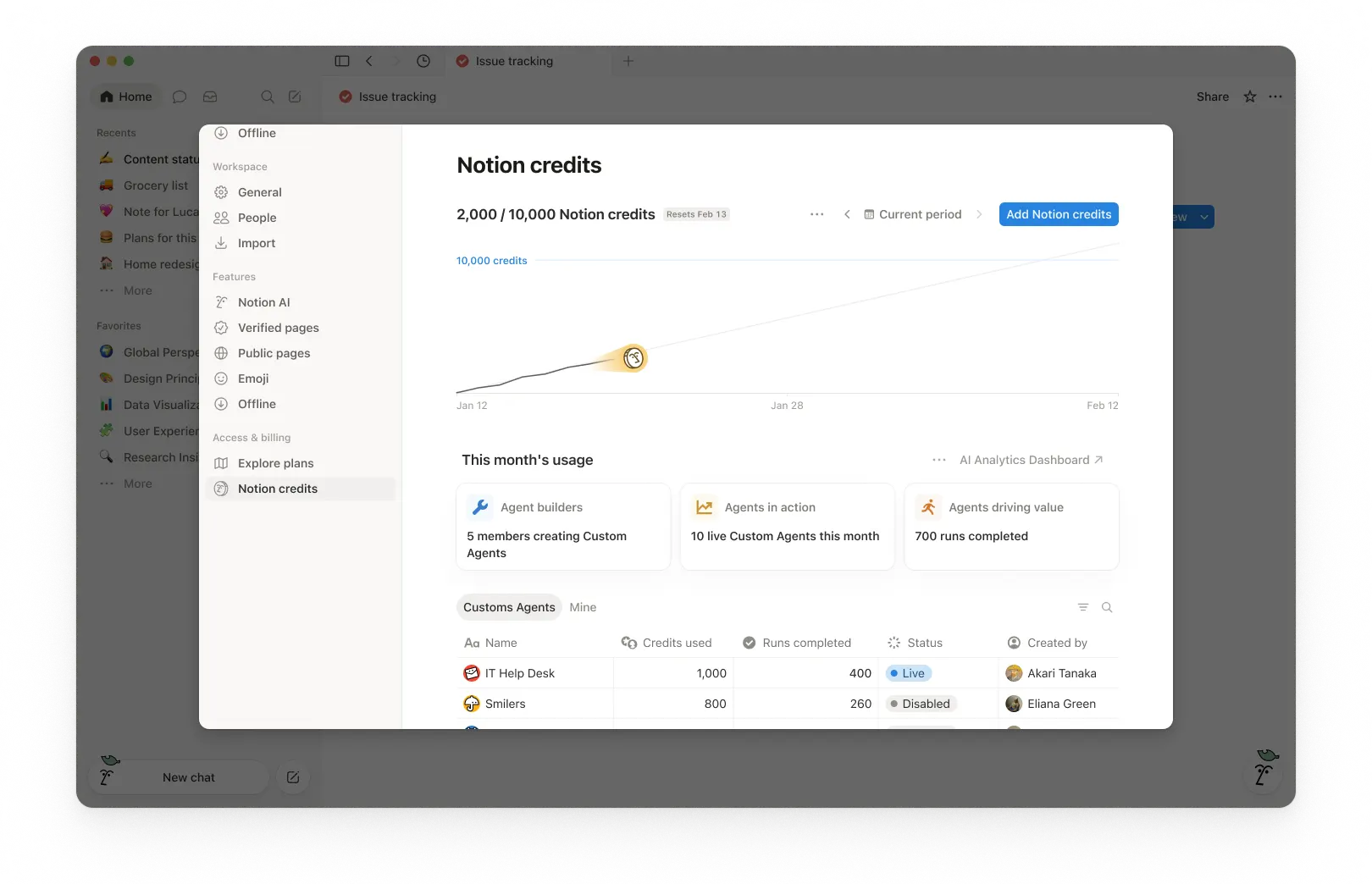
1. Usage summary
At the top of the dashboard, you’ll see the total Notion credits used for the selected period and your credits reset date. The selected period is based on your workspace’s billing cycle.
This gives you a quick snapshot of usage so far and when your monthly billing cycle ends.
2. Time period controls
In the top-right corner, use the period selector (for example, Current period) and navigation arrows to review past periods.
3. Usage chart
The usage chart shows credit usage over time:
Current shows your actual credits used so far.
Estimated projects where your usage is likely to land by the reset date if current patterns continue. The estimate is provided for informational purposes only and actual future usage may differ.
Use this to spot whether you’re pacing toward running out of credits before the reset.
4. Workspace usage cards
Under This month’s usage, you’ll see adoption and activity metrics such as:
Agent builders: How many members are creating Custom Agents.
Agents in action: How many live Custom Agents are running during the period.
Runs completed: How many tasks agents have completed across your workspace.
5. Usage breakdown
The usage table is organized into tabs so you can filter by type.
All: Every Custom Agent, Autofill, and Worker in your workspace.
Custom Agents: Custom Agent spend only.
Autofill: Autofill spend only.
Workers: Worker spend only. Workers show a Free badge during the beta period.
Mine: Only the Custom Agents and Workers you created
For each item, the table shows:
Notion credits used
Runs completed
Status
Created by
Include Worker spend in the main chart
By default, Worker spend is tracked separately from Custom Agent spend and isn't included in the main usage chart or total credit number. To fold Worker spend into the chart and total, select the three-dot menu ••• at the top of the dashboard and toggle on Include Worker spend.
What actions can an admin take to manage credit pacing?
Admins can monitor credit usage and control how Custom Agents run so spend stays predictable.
Admins have several ways to manage credit pacing:
Visibility: Track usage and trends in the Notion credits dashboard.
Guardrails: Decide who can create agents (and set limits).
Control: Pause or switch off agents anytime to stop usage while you investigate or make changes.
Optimize: Fine-tune agents to reduce extra steps and improve efficiency.
1. Monitor usage to know what’s driving spend
Use the Notion credits dashboard to track usage over time and see which features are using the most credits. Notion also notifies admins when the workspace is approaching or has reached the credit limit, so admins have time to act.
2. Set guardrails to prevent surprises
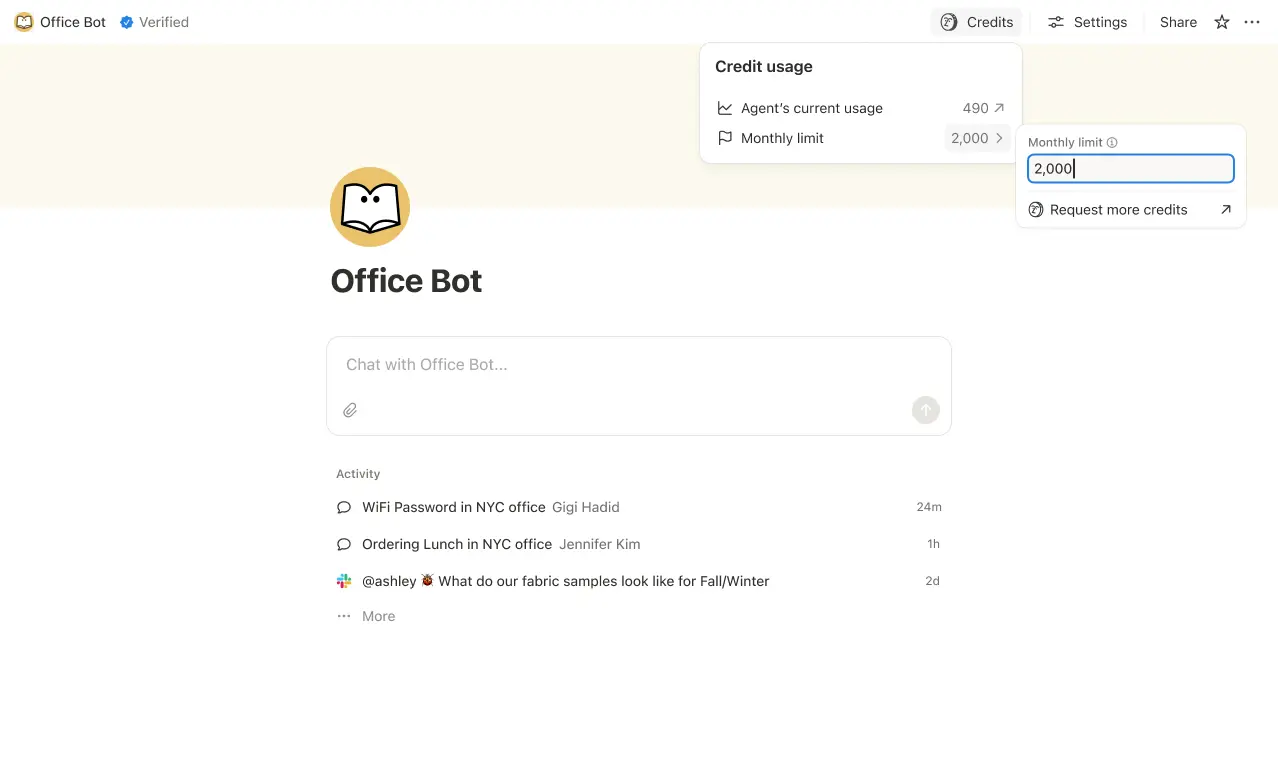
Set credit limits for individual Custom Agents so they pause when they hit a threshold. In some cases, an agent may go over the limit in order to complete an ongoing task. If a task is already running when it hits the cap, we let it finish before stopping new usage.
Control who can create Custom Agents (everyone, workspace owners only, or selected members).

3. Intervene quickly to stop usage
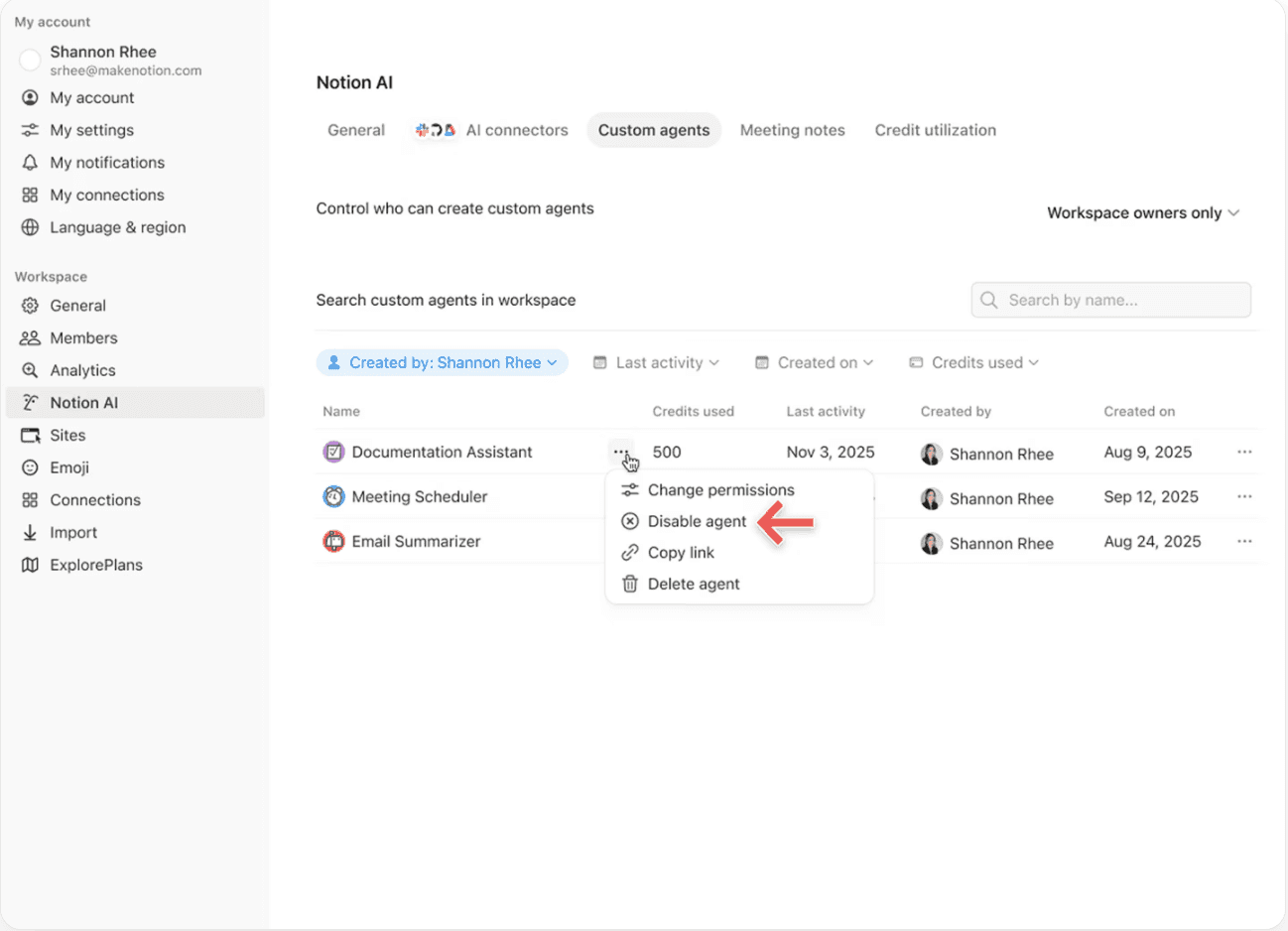
Pause or switch off a Custom Agent anytime to immediately stop credit usage while you review activity or adjust the agent.
4. Use Insights to optimize performance
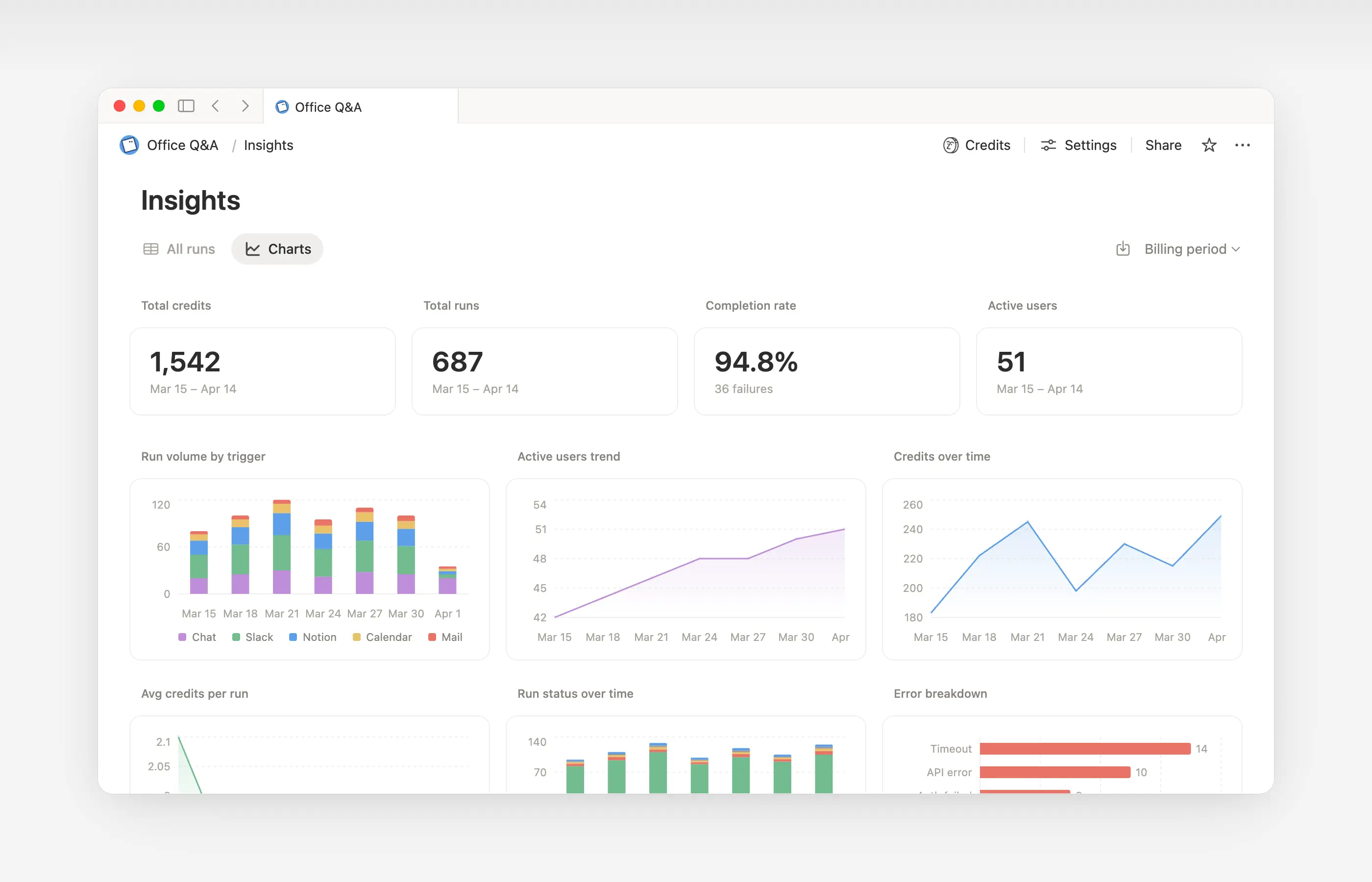
Insights helps Custom Agent creators and workspace admins understand activity so they can make targeted updates that improve performance. Use Insights to spot runs that take extra steps, fail and retry, or use a more expensive model than the job requires. Then, update the agent’s instructions or settings so it runs more efficiently.
Open Insights directly within an agent to:
Monitor your Custom Agent’s activity and credit usage.
Identify runs that are more expensive than expected.
Review what models, tools, and triggers were used.
Find and fix failed runs so your agent works more reliably.
Learn more about how to use Insights to reduce costs and improve a Custom Agent →

Learn what Custom Agents are and how they work.
Learn how Custom Agents access information, how sharing works, and what admins can control: Custom Agents sharing and permissions →
See more best practices on optimizing Notion credits and efficiency for Custom Agents in an admin’s guide to getting started with Custom Agents →
常見問題
如果 Notion 額度用完了會發生什麼事?
如果 Notion 額度用完了會發生什麼事?
如果您的工作空間沒有足夠的 Notion 額度,自訂代理程式將會自動暫停,直到額度重置或管理員新增更多額度為止。
管理員如何在 Notion 額度用完前收到通知?
管理員如何在 Notion 額度用完前收到通知?
當您的工作空間 Notion 額度使用量達到 80% 與 100% 時,管理員會收到應用程式內(與電子郵件)通知,讓您有時間在自訂代理程式暫停前進行調整。
我要如何購買更多 Notion 額度?
我要如何購買更多 Notion 額度?
管理員可以直接在產品內或透過客戶團隊購買 Notion 額度。進一步了解如何購買 Notion 額度。
月中變更 Notion 額度會如何運作?
月中變更 Notion 額度會如何運作?
如果您在每月服務期間中途增加 Notion 額度,額外的額度會立即在當前服務期間內生效。您將在下一個每月服務日期開始時,針對較高的循環額度金額進行計費。
如果您在每月服務期間中途減少 Notion 額度,較低的金額會在下一個服務期間開始時生效。此後,您每個月將針對較低的循環額度金額進行計費。
我透過客戶團隊購買 Notion 額度。如果我在帳單週期中途升級、展開或續訂包含年度 Notion 額度的商業版或企業版方案,會發生什麼事?
我透過客戶團隊購買 Notion 額度。如果我在帳單週期中途升級、展開或續訂包含年度 Notion 額度的商業版或企業版方案,會發生什麼事?
您將獲得未使用的預付年度 Notion 額度的按比例折抵額,金額為以下兩者中較低者:
未使用的年度 Notion 額度美元金額,或
按訂閱期剩餘時間比例計算的年度 Notion 額度費用
此折抵額適用於新的商業版或企業版訂單表單在目前訂閱期結束前取代現有表單的情況。Notion 額度沒有現金價值。任何折抵額皆適用於新方案。
自動填寫功能會使用 Notion 額度嗎?
自動填寫功能會使用 Notion 額度嗎?
自動填寫功能有兩種選項:基礎與自訂代理程式。
基礎自動填寫包含在商業版與企業版方案中,且不會使用 Notion 額度。
自訂代理程式自動填寫會使用 Notion 額度,因為它會以自訂代理程式功能(例如使用更豐富的內容與更進階的推理)執行。
如果我降級方案,自訂代理程式會發生什麼事?
如果我降級方案,自訂代理程式會發生什麼事?
如果您將 Notion 方案降級為免費版或 Plus 版,所有現有的自訂代理程式都會關閉,但不會被刪除。您可以查看(但無法編輯)自訂代理程式的對話頁面與設定。如果您升級回商業版或企業版方案,自訂代理程式即可繼續使用。
如果我透過 App Store 或 Google Play 管理訂閱,可以購買 Notion 額度嗎?
如果我透過 App Store 或 Google Play 管理訂閱,可以購買 Notion 額度嗎?
無法直接購買。如果您的 Notion 訂閱是透過行動應用程式商店(Apple App Store 或 Google Play)管理,您將無法在 Notion 內購買 Notion 額度。
若要購買額度,您需要:
取消您的行動應用程式商店訂閱。
直接在 notion.com 升級至 Notion 方案(包含 AI 的商業版或企業版)。
一旦您的新訂閱生效,管理員即可從
設定→存取與帳單→Notion 額度購買 Notion 額度。
請確保您的新方案包含 AI 功能後再購買額度。Notion 額度僅適用於商業版與企業版。